Worship keyboard patches: layers, splits and one patch per song
How to set up your keyboard sounds for Sunday: piano and pad layers, a left/right split, matched levels between patches, one patch per song and changes without dead air.
In this article12 sections
- What is a patch, and why one per song?
- How do you build a piano and pad layer?
- Where should the split go?
- How do I stop the level jumping between patches?
- What does a patch-per-song set look like?
- How should I name my patches?
- Keyboard alone, or keyboard plus laptop or iPad?
- What do I need to watch with a laptop or iPad rig?
- What are the pedals for?
- How do I change songs without dead air?
- Common mistakes
- Frequently asked questions
Short answer: build one patch per song before Sunday and save it on the keyboard (or in a host like MainStage on a laptop or iPad). Each patch combines only a few things: a layer of piano with a quieter, slow-attack pad, a split with pad in the left hand when you need it, and a level matched to every other patch so the volume doesn’t jump when you switch. Name patches by order, song and key, and change with a footswitch at a rehearsed moment, never mid-phrase.
Knowing which sounds to use is half the job. Our worship keyboard guide already covers the four that handle almost everything on a Sunday; this one is about the other half: how to build them, save them and move between them during the service without the room noticing.
What is a patch, and why one per song?
A patch is a snapshot of your keyboard: which sounds play, on which part of the keys, at what level and with which pedals. Depending on the brand it’s called a program, registration, scene, live set or set list, but the idea is the same: one button that puts the keyboard exactly where you need it.
One per song so each song sounds the way it did in rehearsal. If you’re building layers by hand during the service, every Sunday sounds different, there’s dead air while you scroll, and the week you’re away your sub has nowhere to start.
How do you build a piano and pad layer?
A layer is two sounds on the same keys. Piano plus pad is the go-to layer of modern worship, and it almost always goes wrong the same way: the pad is too loud.
- Piano leads. It stays at its normal level; it’s carrying the rhythm and the harmony.
- Pad well underneath. A useful rule: you should miss it when it’s gone, not hear it as its own instrument. If it’s an ambient pad with a lot of low end, roll some off on the keyboard itself.
- Slow attack on the pad. Just under a second to reach full level. The piano’s transient lands first and the pad fills in behind it instead of smearing the attack.
- Longer release on the pad. When you lift off a chord, the pad fades slowly and covers the gap to the next one.
Strings in a layer follow the same logic, even lower: they come up in the bridge and the last chorus, usually on an expression pedal.
Where should the split go?
A split divides the keyboard into two zones with different sounds. The most useful one at church: pad in the left hand, piano in the right. You hold the harmony with your left while your right plays piano figures, and the pad doesn’t retrigger on every note.
- Start around middle C. Pad below, piano above.
- If the left hand sounds too low, transpose that zone up an octave instead of moving the split. Your hand stays where it is.
- Same split point on every patch. If it moves from song to song, your hand misses on the downbeat.
- Watch the bass player. If there is one, the left zone stays out of the low octaves; the pad sustains, it doesn’t play bass.
How do I stop the level jumping between patches?
Every factory sound sits at a different level and a layer adds two together, so out of the box plain piano comes in quiet and piano plus pad plus strings comes in hot. For the tech, that’s a surprise every song. You fix it once, at home:
- Pick a reference patch, usually plain piano.
- Play every patch with the same touch and adjust its internal volume until it matches the reference. Use a meter if the keyboard or host has one; otherwise, your ears on headphones.
- Leave the master volume fixed, up high, and let your hands and the channel fader on the console handle the dynamics.
What does a patch-per-song set look like?
Here’s a five-song service as an example. These aren’t recipes; it’s a way of thinking about it.
| No. and name | Song type | Layers | Split | Level |
|---|---|---|---|---|
| 01 Opener G | Up-tempo, full band | Bright piano | No | Reference |
| 02 Intimate verse D | Mid-tempo, starts sparse | Rhodes + soft pad | No | Same as 01 |
| 03 Worship E | Slow, congregational | Piano + pad | Left pad / right piano, middle C | Same as 01 |
| 04 Hymn Bb | Arranged hymn | Piano + strings (expression) | No | Same as 01; strings on pedal |
| 05 Ministry E | Prayer, open | Pad only | Whole keyboard | A bit lower |
Two things to notice: every level is matched against the first patch, and when there’s a split, it’s always in the same place.
How should I name my patches?
With three pieces of information: order in the set, song and key. “03 Worship E” is findable in two seconds; “Warm Pad 2 copy” isn’t. Some keyboards only allow a handful of characters per name, so shorten the song before the key: the key is what tells you you’re in the right place.
If your keyboard stores lists or banks, use one list per service and put the patches in the order you’ll play them. Then a “next” footswitch is all you need for the whole set. And write down which patch goes with each song wherever the team keeps its setlists: if the regular keys player is out, the sub shouldn’t have to guess.
Keyboard alone, or keyboard plus laptop or iPad?
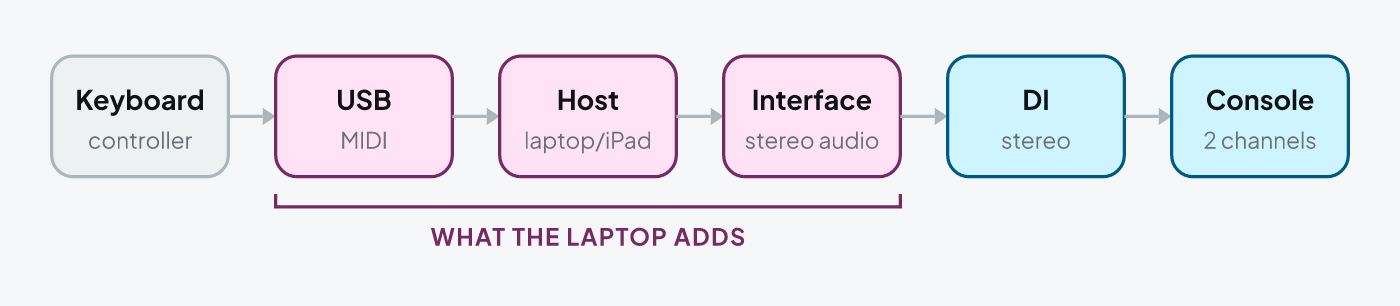
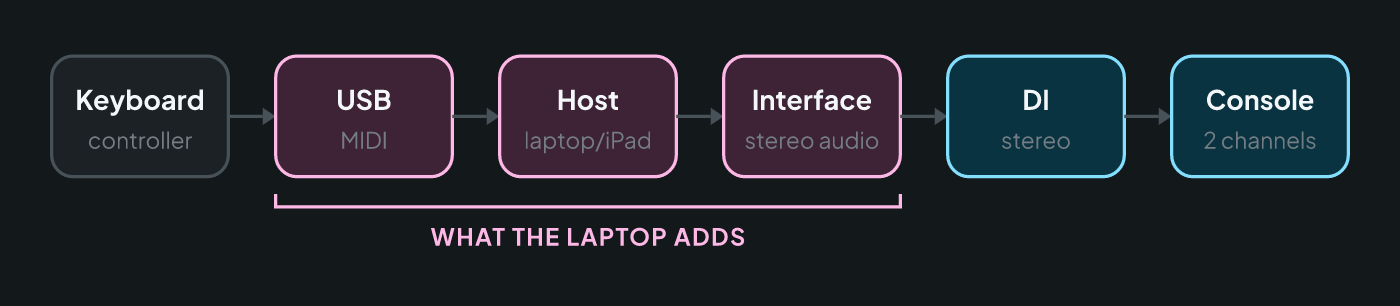
The other route is to use the keyboard as a controller and let the sounds come from a host on a laptop or iPad: MainStage (Mac only, paid and cheap), Gig Performer (Mac and Windows, paid) or Camelot (iPad, Mac and Windows, with a limited free version). The host loads virtual instruments and keeps your per-song patches in its own set list.
| Keyboard alone | Keyboard + laptop or iPad | |
|---|---|---|
| Sounds | Whatever the keyboard has | Practically unlimited (virtual instruments) |
| Per-song patches | Keyboard memories | Host set list, more flexible |
| Setup | Keyboard, DI and cables | Plus interface, USB, charger, stand |
| Latency | None you’ll notice | Low if set up right; noticeable if not |
| Points of failure | One | Several: computer, software, interface, cables |
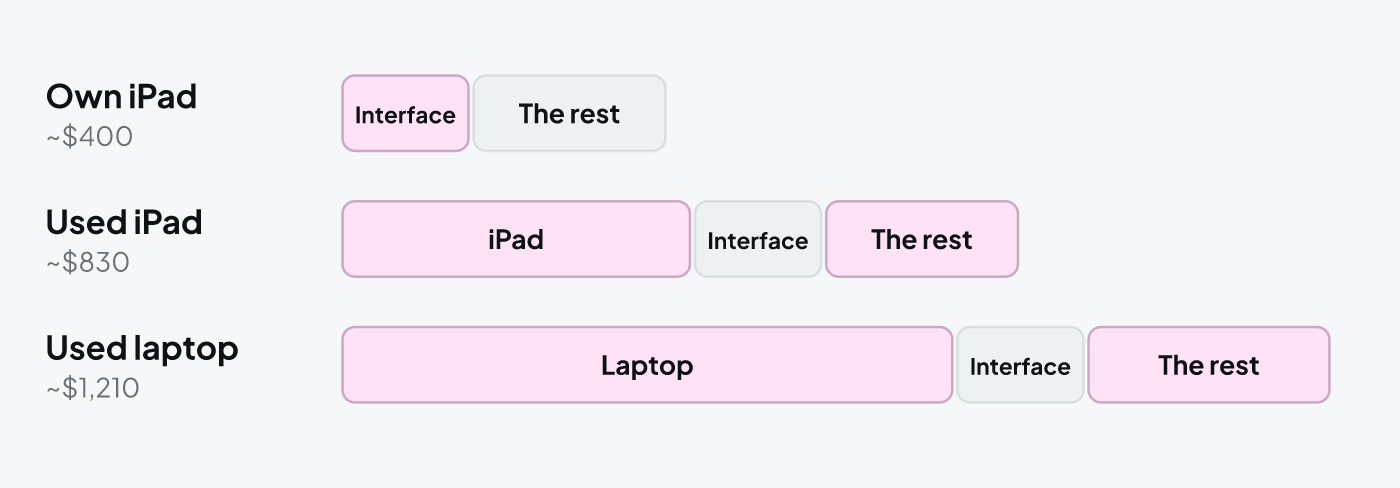
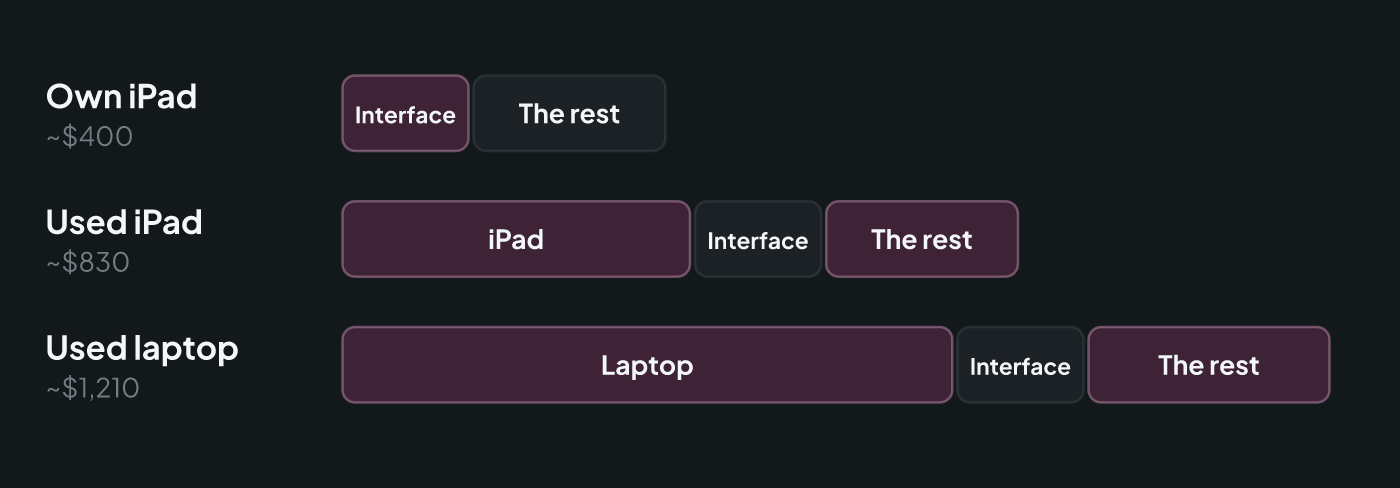
| Added cost | Just the stereo DI (~$100) | From about $400 to well over $1,000 |
What do I need to watch with a laptop or iPad rig?
- Latency. With the interface set up properly (a buffer of 128 or 256 samples as a starting point) you won’t feel it. If notes arrive late, lower the buffer; if you hear clicks and pops, raise it.
- Gig mode. No Wi-Fi, no updates, no notifications, plugged into the wall. A system pop-up in the middle of a prayer time is worse than an average piano sound.
- Secure the cables. USB and power both get a strain-relief loop tied to the keyboard stand so one tug doesn’t pull them out.
- A backup on the keyboard itself. Keep the keyboard’s own outputs patched into two more console channels, muted, with a piano and pad patch ready. If the host crashes, you hit that patch and the tech unmutes those channels: thirty seconds, not a whole song in silence.
What are the pedals for?
- Sustain: on a split, decide whether it affects both zones or just the piano. The pad already holds on its own, and sustain on the pad blurs every chord change.
- Expression: assign it to the strings or pad volume. It’s the most natural way to build a bridge without touching a single button.
- “Next” footswitch: a switch assigned to step to the next patch (on the keyboard or in the host) keeps both hands free through transitions.
How do I change songs without dead air?
The patch change is the touchiest moment: some keyboards cut off whatever is sounding the instant you switch; others, and nearly every host, let the previous sound ring out. Test it at home with a held chord before you trust it.
- Change in a rehearsed gap: on the last chord, once you’ve let go, or in the space before the leader counts in the next song.
- Use the pad as a bridge. If the next patch starts on a pad, bring it in before the previous song ends. If your keyboard cuts off on a change, let an external pad (from your click and tracks app, for example) carry the transition.
- If someone runs tracks, agree on who changes first: you shouldn’t find out about a key change by ear.
- Ask for it in your monitor mix. If you’re on in-ears, ask for your keys a little hot: you’ll hear the patch change in your ears before the room does.
Common mistakes
- The pad as loud as the piano. The layer sounds like two instruments fighting instead of one piano with some air around it.
- Unmatched levels. The tech spends every song chasing your fader.
- Building layers live. Dead air, button-pushing and a different sound every Sunday.
- A different split on every patch. Your left hand misses the downbeat.
- A laptop with no backup. The day it crashes, the keys go silent.
Frequently asked questions
How do I layer piano and pad on my keyboard?
Put both sounds on the same keys (a layer) and set them separately: the piano at its normal level and the pad well underneath, with a slow attack so it swells in behind each chord instead of hitting at the same time. You know it's right when you miss the pad as soon as you turn it off, but you can't hear it as a separate instrument while it's on.
Where should I set the split point between my hands?
Around middle C is the usual starting point: pad or strings below for the left hand, piano above for the right. If the left hand sits too low, transpose that zone up an octave rather than moving the split. Keep the split in the same place on every patch so your hand never has to remember where it is song to song.
Do I need a laptop running MainStage to play keys at church?
No. Almost any mid-range keyboard stores layers, splits and levels in its own memory (programs, registrations, scenes or set lists depending on the brand), and that covers a whole service. A laptop or iPad running a host like MainStage, Gig Performer or Camelot opens up a much bigger sound palette, but it adds an interface, cables, latency and another thing that can fail. It makes sense when the keyboard runs out of road, not as a first step.
Why does my level jump when I change patches?
Because every factory sound sits at a different level, and a layer adds two of them together. Fix it at home: pick a reference patch (usually plain piano), play every patch with the same touch and adjust its internal volume until it's as loud as the reference. Leave the keyboard's master volume fixed and let the sound tech ride the fader.